2026-06-07
How can document signing and workflows be streamlined in an organization? Discover flow template in CertumSign
In a world where the pace of work increases year by year, and business processes need to be not only fast but also error-free, every feature that streamlines everyday tasks becomes a real advantage. One such solution is flow template in the CertumSign platform, which streamline the process of obtaining electronic signatures from multiple signatories.
From this article you will learn:
- what flow template are and how they work in the CertumSign platform
- what problems they solve in everyday document workflows
- how to create and configure your own templates step by step
- which process elements can be defined in a template
- how to automate the document signing process in an organization
- what benefits templates bring to teamwork
- how templates help reduce errors and speed up processes
Process templates in organization plans
The new flow template feature enables users to create repeatable, structured document signing processes. This represents a significant improvement in situations where various types of documents requiring a signature or approval are sent on a regular basis. It eliminates the need to configure the process from scratch each time, minimizes the risk of errors and significantly reduces the time needed to launch another document sending process. In practice, this means greater efficiency, better work organization and full control over repetitive signing processes.
With this solution, the process can be fully automated, without the risk of omitting any participants or delays in collecting the required signatures. The system also allows users to send reminders to sign a document at a time they specify, which significantly improves document workflows and helps ensure documents are signed on time.
The flow template selection screen is a clearly laid-out window showing the available templates together with the people assigned to them.
Let us look at this process using the example of a template called “Management Board”, which is used to send documents for signature to specific people on a recurring basis, e.g. once a week. This template has a predefined list of workflow participants, so there is no need to enter all the data each time the process is launched.
In the template, you can define:
- the number of people participating in the workflow,
- the time allowed for signing the document,
- the required type of signature,
- the option to approve the document only, without signing it.
Flow templates can also be edited, for example by adding or removing pre-defined group of people in the workflow.
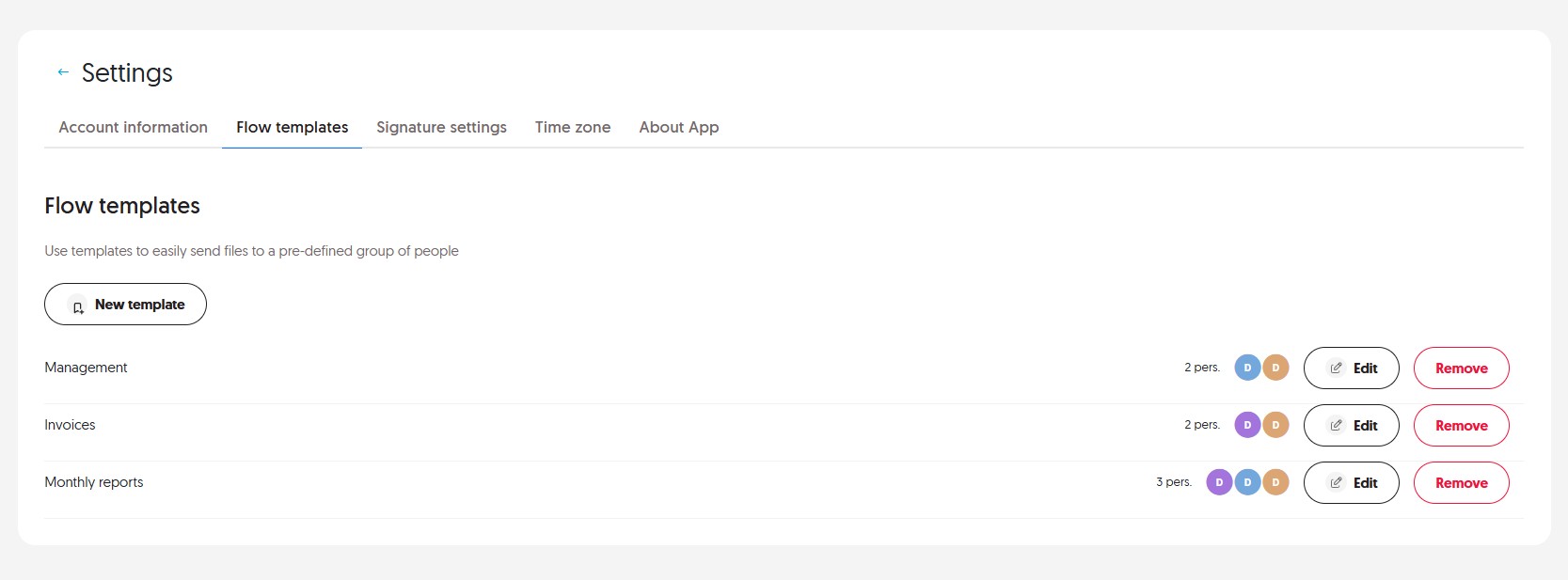 Document flow template selection view
- Creating a template
Creating a new template in the system starts by selecting the “New template” option. Next, you need to identify the participants in the document workflow, i.e. the people responsible for signing the document. At this stage, it is important to select the correct users.The next step is to define the signature type for each person. Depending on the formal requirements or available permissions, a specific type of signature can be selected. This is particularly useful where the type of signature held by a given user is not known.
Another important configuration element is specifying the time allowed for completing the action, i.e. signing the document. This makes it easier to manage the process and monitor its progress.
Once all participants and process parameters have been defined, the template should be given a name that clearly indicates its purpose. The final step is to save the template, making it available for reuse in the future.
A well-prepared template significantly speeds up process execution and minimizes the risk of errors, especially in frequently repeated document workflows.
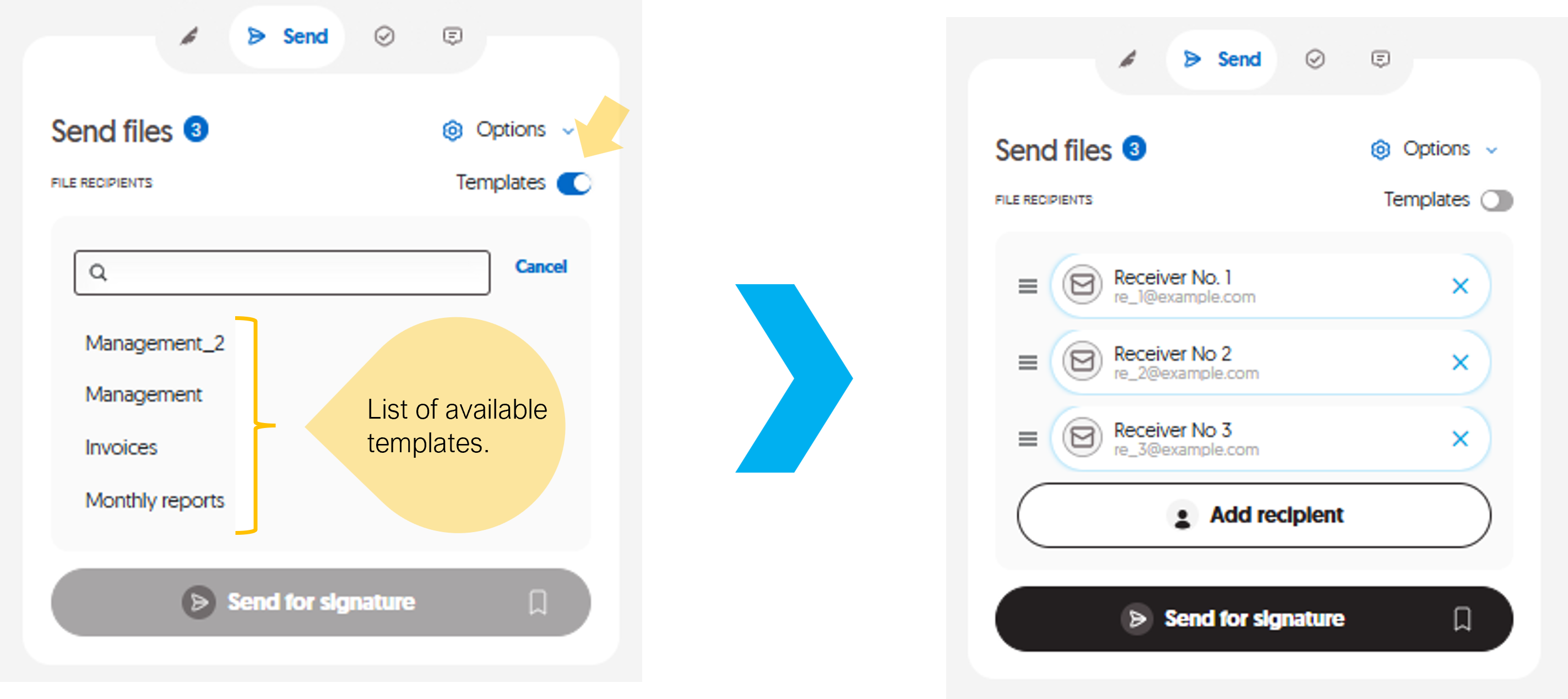 New flow templates creation view (when adding an external recipient)
 - Sending documents for signature
To proceed to document sending, move the slider available on the screen. This will display a list of available templates. Once the appropriate template has been selected, the workflow participants will be populated automatically, based on the template’s configuration. There is no need to enter data manually; simply send the document for signature to launch the entire process.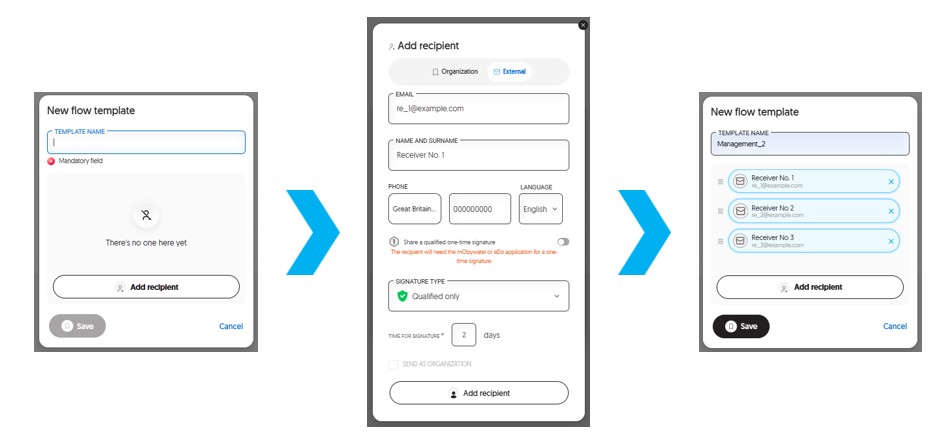 File Sending view
Key benefits of using flow templates
Using templates in document workflows brings a number of practical benefits that directly improve work efficiency:
- Time savings
There is no need to create the process from scratch each time; once prepared, a template can be used repeatedly. - Ability to define regular recipients
Templates can be prepared for specific, frequently recurring recipients, eliminating the need to search for and add them each time. - Automatic signature or approval settings
For each participant, the required type of action can be defined in advance—whether a signature or approval of the document—allowing you to tailor the level of formality to the type of process. - Ability to choose approval as the form of authorization
Templates allow an e-signature to be replaced with approval, speeding up decision-making processes where the full legal force of an electronic signature is not required. This makes it possible to approve documents more quickly and reduce formalities, both within and outside the organization. - Process standardization
Establishing uniform rules (e.g., the type of signature or approval and the sequence of actions) ensures consistency and compliance with the organization’s requirements. - Fewer errors
Defining the participants and process parameters in advance minimizes the risk of omitting someone, entering incorrect data or making typos. - Faster workflow launch
A ready-made template allows the process to be started practically with a single click, without the need for additional configuration. - Greater convenience in teamwork
Templates made available to other users in the organization can be shared and used by different people in similar processes.
Introducing flow templates is a step towards automating and structuring document signing processes. Try this feature today and see how much easier it can make your everyday work.
- Time savings